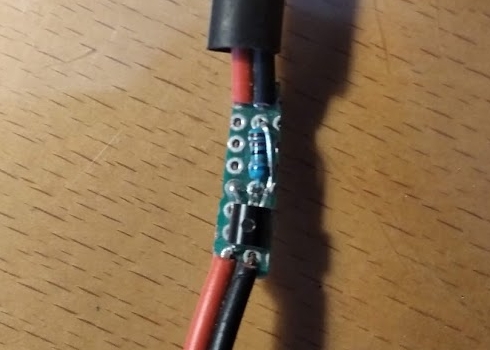
Polarity inverter
Summary
This circuit is used to invert the polarity of an input pin. A "triggered while open" sensor is converted to a "triggered while closed". The same result could be achieved by using logic gates but this circuit does not require a VCC connection so it is more of a plug-and-play solution. In this project the inverter schematic is explained.
The problem
Inverting an input polarity by hardware may be easier than a software solution at times. This inverter was developed for a 3D printer's min-z sensor. The problem was having two alligator clips plug in where the original sensor docks and having them trigger on contact.
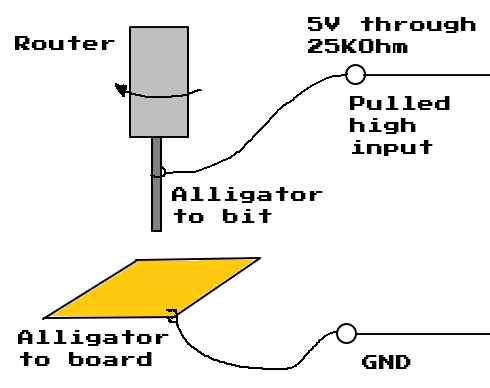
The previous setup won't work since the z-min sensor is triggered while open by default.
Tackling the problem
A circuit must be placed in between the alligator clips and the sensor and ground pins. This circuit should be pulling the sensor pin low when the alligator clips are not in contact. When there is continuity between the alligator clips, the sensor side should remain high.
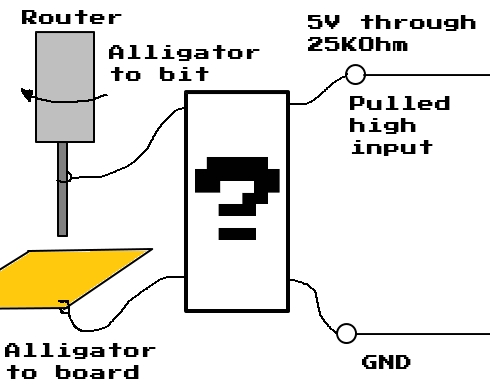
The solution
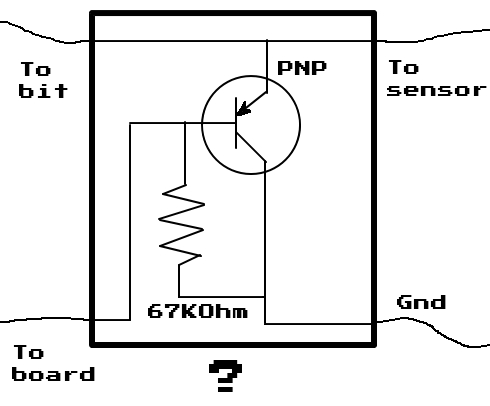
This simple circuit meets all the demands stated above.
- When there is no continuity between the bit and the copper board, the base of the PNP is pulled low through the 67KOhm resistor. The transistor activates and pulls the sensor pin low.
- When there is continuity between the bit and the copper board, the base of the PNP is pulled high through the sensor pin's 25KOhm internal pull up resistor. The two resistors (25K and 67K Ohms) form a voltage divider and the sensor pin is pulled to 3.1V which is more than enough to trigger its high state.
Implementation
This inverter was used to enable auto leveling on copper clad boards with a modded 3D printer. (project available here)